Stocktaking Software in Iraq: Tools for Accurate Counts
A practical guide to stocktaking software for Iraq businesses: barcode counts, variance checks, POS inventory, branch stock, worked math, and launch checklist.

Stocktaking software helps Iraq businesses count physical stock, compare it with system stock, find shortages or overages, and correct inventory records. The best setup connects barcode counting with POS sales, purchases, transfers, adjustments, roles, and reports so owners know whether stock differences came from sales, purchases, damage, transfer mistakes, or counting errors.
01
Stocktaking Software in Iraq: Tools for Accurate Counts
Stocktaking is the moment when system inventory meets the real shelf. If the two numbers do not match, the owner needs a clean way to find the reason, not a spreadsheet fight at the end of the day.
Quick answer: Stocktaking software helps Iraq businesses count physical stock, compare it with system stock, find shortages or overages, and correct inventory records. The best setup connects barcode counting with POS sales, purchases, transfers, adjustments, roles, and reports so owners know whether stock differences came from sales, purchases, damage, transfer mistakes, or counting errors.
02
What stocktaking software does
Stocktaking software organizes the counting process. Instead of writing quantities on paper, the team counts products by item, barcode, category, shelf, branch, or warehouse. The system compares the counted quantity with expected stock and shows variance.
For a mini-market, pharmacy, clothing shop, electronics store, or supermarket in Iraq, this matters because hundreds or thousands of small differences can hide inside daily sales. A count without variance review only tells you that numbers are different; good software helps explain why.
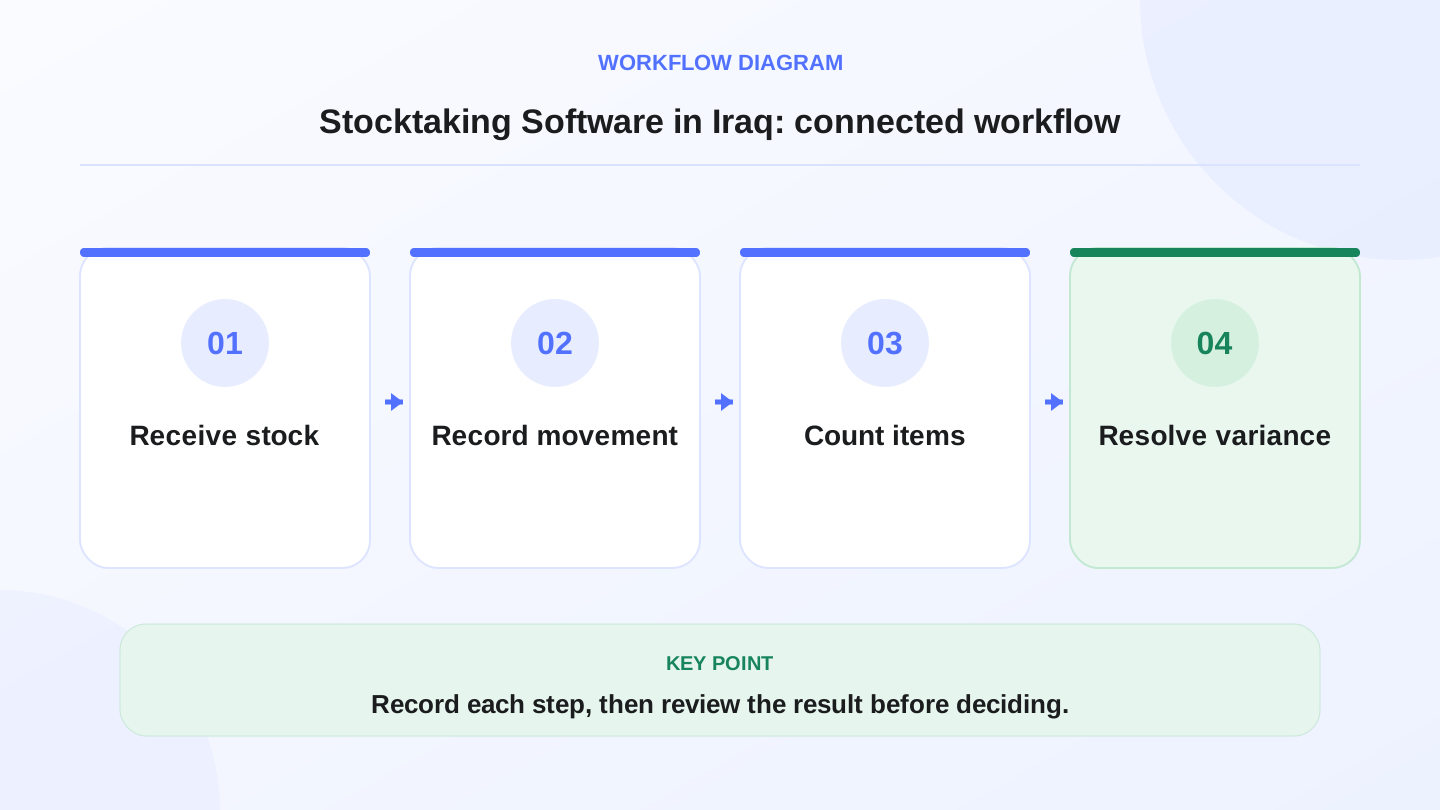
A practical sequence has four connected steps: Receive stock, Record movement, Count items, Resolve variance. Recording each step makes the daily result easier to review.
03
Why manual stock counts break down
Manual counts can work when a business has few products and one trusted person. They become unreliable when products have variants, barcodes, multiple units, damaged items, purchases during the count, or sales happening at the same time.
The usual failure is simple: the team counts a shelf, someone sells from that shelf, another person receives purchases, and the spreadsheet no longer matches reality. The owner then spends hours asking whether the count, the sale, or the purchase is wrong.
Stocktaking software reduces that confusion by connecting the count with live POS, purchases, transfers, and adjustments.

04
Features to look for
Use this table during a demo. If the system cannot show expected quantity, counted quantity, and variance clearly, it will be hard to trust.
| Feature | Why it matters | Practical test |
|---|---|---|
| Barcode counting | Speeds product identification | Scan 30 real items |
| Variance report | Shows difference between expected and counted | Review shortage and overage lines |
| Branch or warehouse filter | Counts one location without mixing others | Count only one branch |
| Adjustment approval | Prevents casual stock changes | Cashier cannot approve variance |
| Purchase link | Explains recent stock increases | Receive a bill then count |
| POS link | Explains stock decreases from sales | Sell items during a test period |
| Arabic item names | Helps local teams count correctly | Print or view Arabic count list |
05
Worked example: finding stock variance
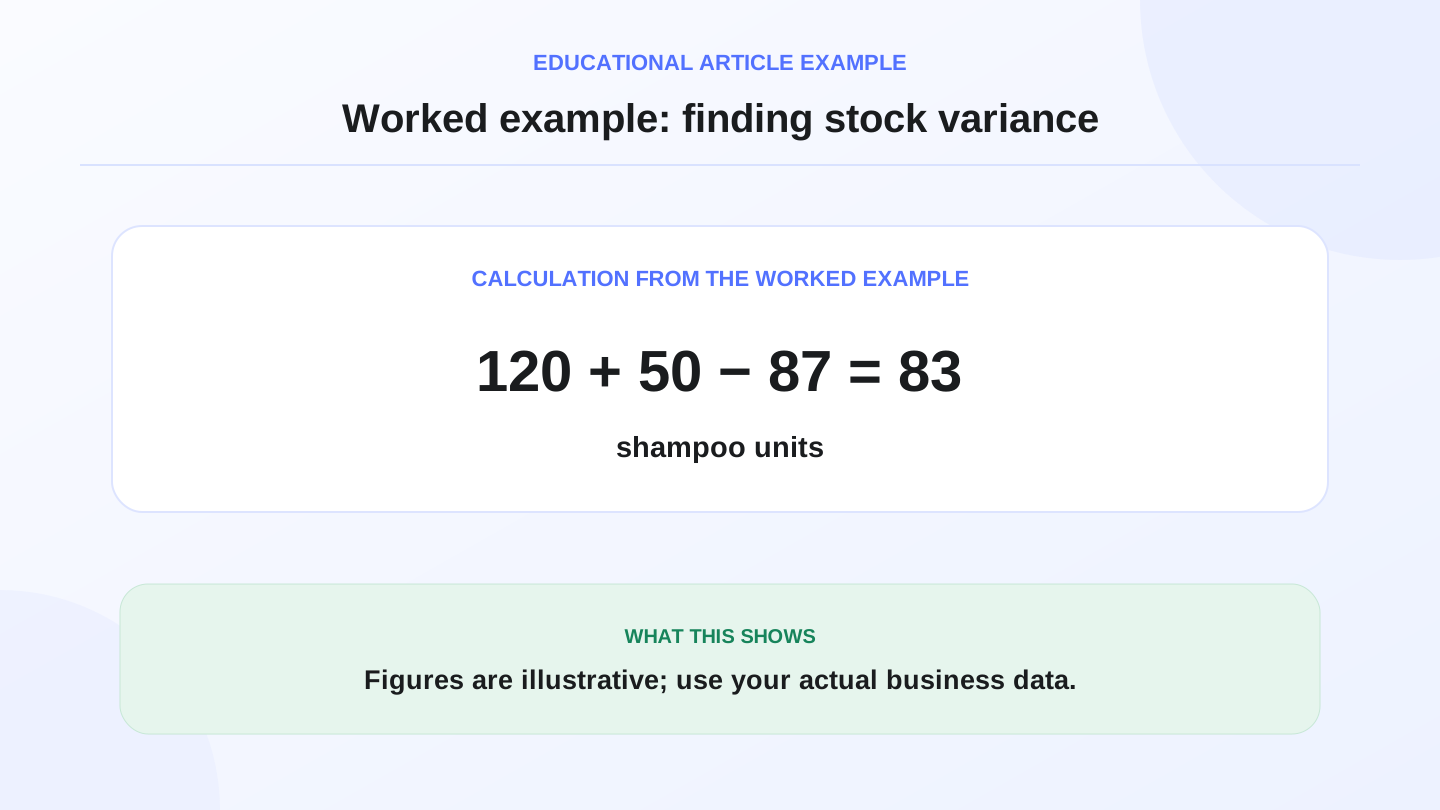
Assume a cosmetics shop starts with 120 units of one shampoo. During the month it buys 50 units and sells 87 units through POS.
Expected stock is: 120 opening + 50 purchases - 87 sales = 83 units.
During stocktaking, the team counts 79 units. Variance is 79 counted - 83 expected = -4 units. The shortage is 4 units. That shortage might come from damaged items, unrecorded sales, supplier quantity mistakes, theft, wrong barcode mapping, or counting error. The software does not magically know the reason, but it gives the owner the exact line to investigate.
06
Barcode counting and product variants
Barcode software is especially useful for retail, supermarkets, pharmacies, cosmetics, electronics, and clothing stores. A barcode reduces confusion between similar items and makes counting faster. For creating labels, choosing scanners, and GS1 basics before count week, read barcode for shops in Iraq.
Variants still need attention. A black medium shirt and a black large shirt should not share the same stock record. If variants are mixed, the total may look correct while the sizes are wrong. Stocktaking software should let the team count at the product and variant level when needed.
07
Branches, warehouses, and transfers
Multi-branch businesses need location-aware counts. Baghdad branch stock should not be mixed with Basra branch stock, and warehouse stock should not be treated as shelf stock until a transfer is recorded.
A clear transfer workflow matters: branch A stock decreases, branch B stock increases, and the movement appears in reports. If transfers happen informally, stocktaking becomes a guessing exercise.
RA8M is positioned for businesses that need POS, inventory, purchases, reports, roles, and branches together. Review RA8M POS, industries, and pricing when comparing connected inventory systems.

08
When a simpler count is enough
A very small business with 30 products, one owner, and no barcode process may count manually for a while. A simple spreadsheet can be enough if sales volume is low and the owner personally checks every purchase. This is common in early-stage shops where the same person buys, sells, and counts.
Upgrade when the business adds staff, categories, variants, warehouses, branches, online orders, or high-volume daily sales. At that stage, the cost of wrong stock is not only the missing item; it is canceled orders, slow purchasing, unreliable reports, and owner stress.
The trigger is usually not product count alone. It is the number of movements: POS sales, supplier bills, returns, damage, transfers, online orders, and manual corrections. When those movements become hard to reconstruct, the business needs software discipline.
09
How stocktaking connects to purchases and reports
A count is more useful when it is connected to the money trail. If the stocktake shows a shortage, the owner should be able to review recent purchases, vendor bills, sales, transfer records, and adjustments before approving the final correction.
For example, a supermarket may see a shortage in a fast-moving beverage. Without connected records, the team only knows the shelf count is wrong. With connected POS and purchase history, the manager can check whether the supplier delivered the expected quantity, whether a cashier sold the item under the wrong barcode, or whether damaged stock was never recorded.
This is why stocktaking should not live in isolation. It should feed inventory value, purchasing decisions, and management reports.
10
Stocktaking process for Iraq shops
1. Freeze or define the counting window.
2. Confirm all purchases and transfers are entered.
3. Count by category, shelf, branch, or barcode.
4. Review high-value and fast-moving items first.
5. Investigate major shortages before approving adjustments.
6. Record damage, expiry, theft suspicion, or supplier mistakes separately.
7. Approve adjustments with a manager role.
8. Review the final variance report after the count.
This process works for retail shops, supermarkets, pharmacies, salons with products, bakeries, and warehouses. The details change, but the principle is the same: count, compare, investigate, approve.
Before buying, compare how free sales and inventory software handles counts versus live POS deductions in free sales and inventory software in Iraq.
11
Conclusion
Stocktaking software is not only a counting screen. It is a control system for knowing whether your physical stock matches your business records. For Iraq businesses, the strongest option is connected to POS sales, purchases, branches, roles, and reports.
If your stock is small and simple, a manual count may be enough today. If stock mistakes affect sales, purchasing, or customer trust, use software that makes variance visible and traceable. RA8M fits businesses that want inventory discipline connected to daily selling instead of a separate spreadsheet.
Frequently asked questions
What is stocktaking software?
Stocktaking software helps teams count physical items, compare counts with system inventory, identify variances, and approve inventory adjustments with cleaner records.
Do small shops in Iraq need stocktaking software?
A very small shop can start manually, but stocktaking software becomes useful when products, barcodes, branches, staff, or purchase volumes increase.
How often should a business count stock?
Fast-moving items can be cycle-counted weekly or monthly, while full stocktakes may happen monthly, quarterly, or before major reporting periods depending on the business.
Does RA8M support stock control?
RA8M supports inventory, product categories, movements, purchases, adjustments, low-stock indicators, reports, branches, and POS-connected stock workflows.
Written by
RA8M Team
Practical guides for restaurants, shops, and operations teams
Next step
Try RA8M with data close to your operation
Read next
Related RA8M guides
Inventory and Warehouse
Warehouse Management System in Iraq: A Practical Guide
Read article
Inventory and POS
Barcode Software in Iraq: Faster Cashier and Cleaner Stock
Read article
Inventory and Warehouse
Inventory Adjustments and Shrinkage in Iraq: Control Stock Variance
Read article
Inventory and Warehouse
Low Stock Alerts in Iraq: Reorder Before Shelves Go Empty
Read article
Retail Shops
Shoe Store Software in Iraq: POS, Sizes, Stock and Reports
Read article