Warehouse Software in Iraq: Stock, Transfers and Reports
A practical guide to warehouse software in Iraq for controlling stock, purchases, transfers, barcodes, counts, and daily reports across shops and branches.

Warehouse software helps Iraq businesses control stock quantities, purchases, transfers, adjustments, barcode movements, and warehouse reports from one place. The strongest setup connects warehouse records with POS sales, inventory counts, supplier bills, branches, and ecommerce orders so stock changes are not entered twice or guessed at the end of the day.
01
Warehouse Software in Iraq: Stock, Transfers and Reports
Warehouse software in Iraq should help owners know what stock they have, where it is, why it changed, and when to reorder. It is not only a storage list; it is the operational layer between purchases, POS sales, branch transfers, online orders, and daily reports.
Quick answer: Warehouse software helps Iraq businesses control stock quantities, purchases, transfers, adjustments, barcode movements, and warehouse reports from one place. The strongest setup connects warehouse records with POS sales, inventory counts, supplier bills, branches, and ecommerce orders so stock changes are not entered twice or guessed at the end of the day.
02
What does warehouse software actually control?
Warehouse software controls the movement of products and materials from receiving to selling. For a retail shop, that may mean cartons arriving from a supplier, items moving to shelves, barcode sales reducing stock, and a count at the end of the month. For a restaurant or bakery, it may include raw materials, recipes, damaged items, and finished goods.
The key word is movement. A static list tells you what someone typed yesterday. A warehouse system records what happened: purchase received, quantity transferred, sale completed, item adjusted, damaged stock removed, and branch stock reviewed. That history is what makes the report useful when the owner asks why stock changed.
03
Warehouse software vs inventory software
Many teams use the words together, but the operational depth is different. Inventory software answers, "How many do we have?" Warehouse software should also answer, "Where did it come from, where did it go, who moved it, and what should we reorder?"
If your business has one shelf and ten items, a basic list may work. If you have a warehouse, a shop floor, several staff, or branches, you need the movement trail.
| Area | Basic inventory list | Warehouse software connected to POS |
|---|---|---|
| Product quantities | Manual or periodic | Updated by purchases, sales, returns, and counts |
| Receiving stock | Simple addition | Supplier bill, item lines, cost, and receipt trail |
| Branch transfers | Often handled by chat | Transfer out, transfer in, and variance review |
| Barcode use | Optional | Central for fast movement and checkout |
| Reports | Quantity snapshot | Movement, value, sales impact, and low stock |
04
Why POS connection matters more than the warehouse screen
A warehouse screen can look organized while the real stock is wrong. This happens when the cashier sells items in one system, purchases are recorded somewhere else, and online orders are tracked in a third tool. The warehouse report then depends on someone remembering to update everything manually.
A connected workflow is stronger. When staff sell through RA8M POS, stock can move from the same item record used by purchases, reports, and ecommerce. That gives the owner one operational source instead of separate lists for cashier, store room, and online orders.
05
Core features to check before choosing software
Start with item structure. The system should support product names, categories, barcodes, variants, units, prices, costs, and active or inactive status. Retailers need variants such as size and color. Supermarkets need barcode speed. Restaurants and manufacturers may need raw materials and formulas.
Then check operations: purchase bills, stock increases, adjustments, returns, transfers, low-stock alerts, and reports. Also check permissions. The person who sells at the counter should not necessarily be able to change stock cost, delete a movement, or approve a major adjustment.
06
Worked example: expected warehouse quantity
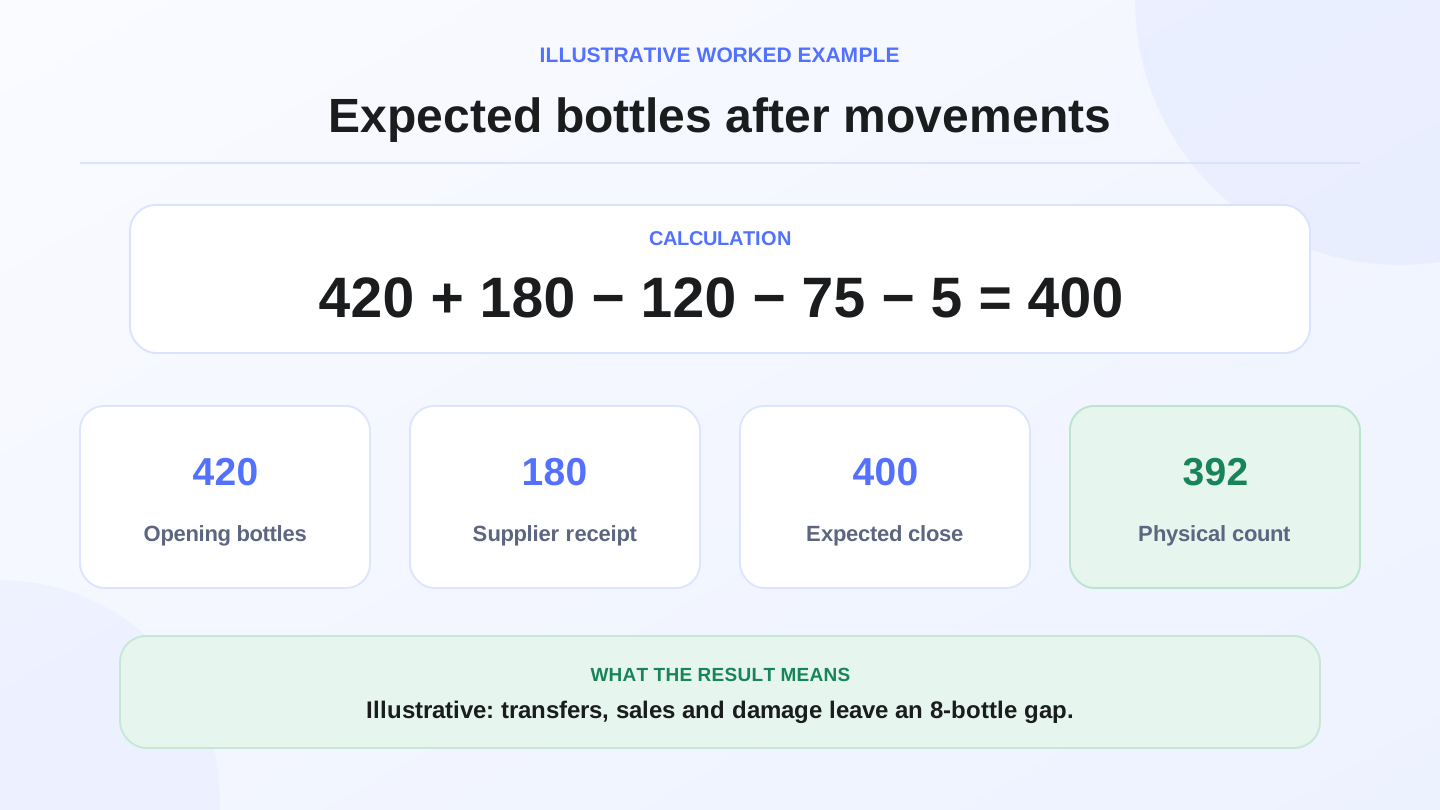
Imagine a cosmetics shop in Baghdad starts the week with 420 shampoo bottles in the warehouse. It receives 180 bottles from a supplier, transfers 120 bottles to the main branch, sells 75 bottles through the POS, and adjusts 5 damaged bottles.
The expected closing stock is: 420 + 180 - 120 - 75 - 5 = 400 bottles. If the physical count shows 392, the variance is 8 bottles. The owner can now investigate whether the issue came from scanning, receiving, transfer confirmation, theft, breakage, or a counting mistake. The math is simple; the value is in having every movement recorded.
07
How warehouse software supports purchases and suppliers
Purchases are where many stock problems begin. If staff receive goods without item lines, costs, and supplier references, the system cannot explain stock value later. A proper warehouse workflow records what was ordered, what arrived, what cost was used, and whether the quantity entered the correct warehouse or branch.
RA8M public product information describes purchases, vendor bills, inventory movements, finance, and reports as connected modules. That connection is useful because a purchase should update stock and leave a money trail instead of living as a separate note or paper invoice.

08
Branch transfers need a two-sided process
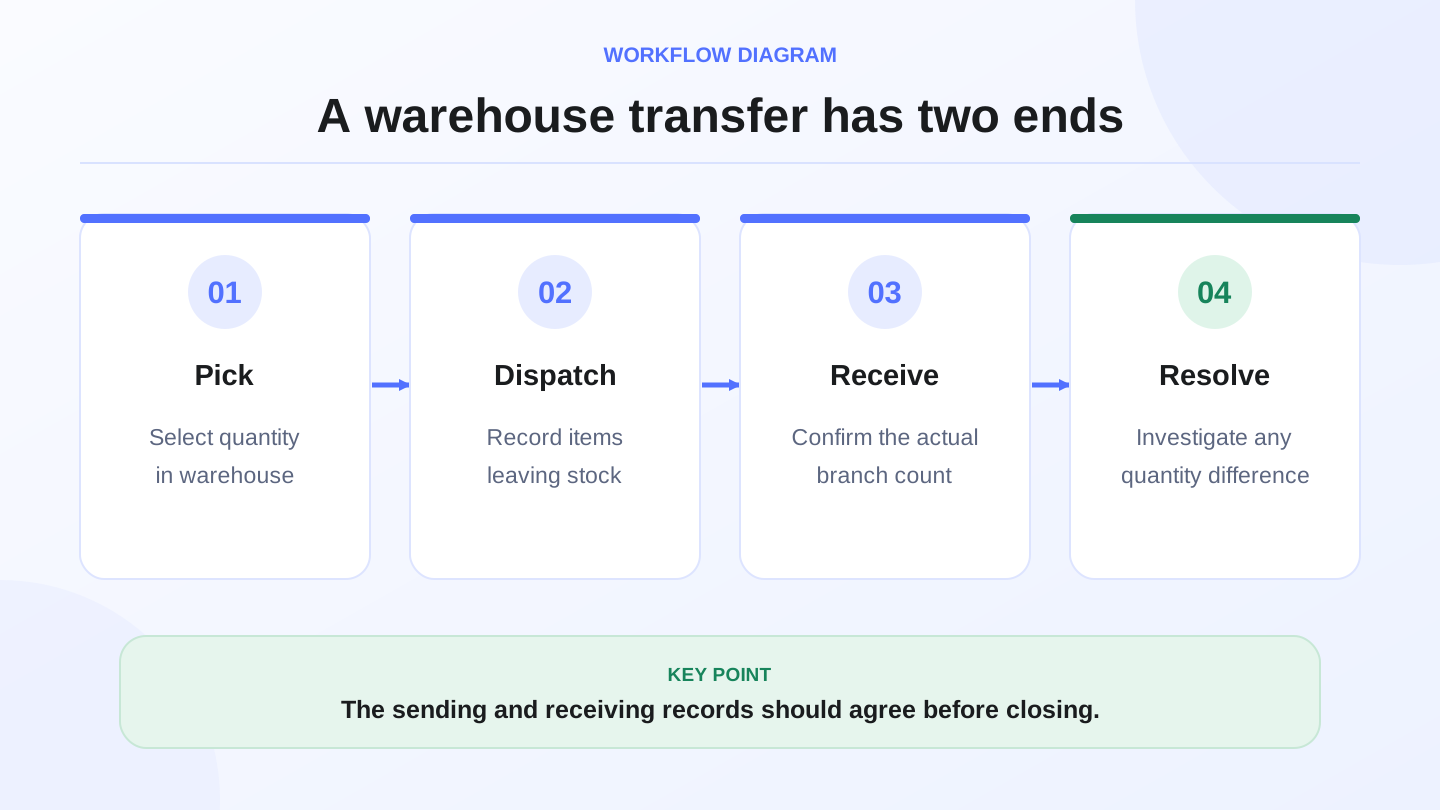
A transfer is not complete when the sending branch says, "We sent it." It is complete when the receiving branch confirms what arrived. Iraq businesses with branches in Baghdad, Basra, Erbil, Najaf, or Mosul can lose accuracy if transfers happen through messages without confirmation.
Use a two-sided process: branch A creates the transfer, branch B receives and checks it, and any shortage is recorded. This protects both teams. It also gives the owner a clean report of inter-branch movement, not just a reduced number in one location.
09
Counts, adjustments, and shrinkage control
Stock counts are not only for year-end. High-moving products should be counted more often than slow-moving products. A mini-market may count cigarettes, phone cards, and fast grocery lines weekly. A clothing shop may count expensive accessories or best-selling sizes more often than old stock.
Adjustments should always have a reason: damage, expiry, supplier error, theft investigation, sample use, or counting correction. Without reasons, adjustments become a hiding place for operational mistakes. A good system makes the adjustment visible in reports and protects it with permissions.
10
When RA8M fits and when a simpler setup may be enough
RA8M fits when your warehouse is connected to selling, purchases, reports, branches, or ecommerce. It is especially useful for shops, supermarkets, pharmacies, restaurants, cafés, manufacturers, and multi-branch operators that need Arabic and English workflows, IQD, roles, and offline-ready cashier selling.
A simpler setup may be enough when you have one small location, few SKUs, no branches, and low daily movement. The risk is waiting too long. Once product names, costs, barcodes, and quantities become messy, migration takes longer than starting clean.
11
Implementation checklist for Iraq businesses
1. Clean product names and categories before import.
2. Add barcodes and units for high-moving items.
3. Define who can receive, transfer, adjust, and count stock.
4. Connect warehouse stock to POS sales and returns.
5. Record supplier bills and purchase quantities consistently.
6. Run a first physical count and compare expected vs actual quantities.
7. Review low-stock and slow-moving reports before reordering.
After the first month, compare the operational result with your plan on the RA8M pricing page. Pricing can change, so verify current plans before buying.
12
Conclusion
Warehouse software should make stock explainable. It should show what arrived, what sold, what moved between branches, what was adjusted, and what needs reorder. For Iraq businesses, the best result comes when warehouse records connect to POS, purchases, ecommerce, roles, and reports in one workflow.
Explore RA8M POS, review industry workflows, or compare plans on RA8M pricing to decide whether your warehouse needs a connected system now.
13
FAQs
What should warehouse software include for Iraq shops?
It should include item records, barcode movements, purchases, transfers, adjustments, stock counts, low-stock alerts, branch visibility, and reports connected to POS sales.
Is warehouse software different from basic inventory software?
Basic inventory software tracks quantities. Warehouse software usually adds receiving, transfers, locations, counts, adjustments, supplier bills, and deeper operational controls.
Why should warehouse software connect to POS?
POS connection keeps stock updated after every sale, return, purchase, or online order instead of forcing staff to update warehouse records manually.
When is a simple spreadsheet enough?
A spreadsheet may be enough for a very small business with few products, one location, and low sales volume, but it becomes risky when branches, barcodes, purchases, and staff roles grow.
Frequently asked questions
What should warehouse software include for Iraq shops?
It should include item records, barcode movements, purchases, transfers, adjustments, stock counts, low-stock alerts, branch visibility, and reports connected to POS sales.
Is warehouse software different from basic inventory software?
Basic inventory software tracks quantities. Warehouse software usually adds receiving, transfers, locations, counts, adjustments, supplier bills, and deeper operational controls.
Why should warehouse software connect to POS?
POS connection keeps stock updated after every sale, return, purchase, or online order instead of forcing staff to update warehouse records manually.
When is a simple spreadsheet enough?
A spreadsheet may be enough for a very small business with few products, one location, and low sales volume, but it becomes risky when branches, barcodes, purchases, and staff roles grow.
Written by
RA8M Team
Practical guides for restaurants, shops, and operations teams
Next step
Try RA8M with data close to your operation
Read next